Installing MicroPython
To facilitate the installation of the MicroPython PSOC™ Edge port, the mpy-pse.py Python script is provided. It is compatible with Windows,
Linux and MacOS.
Before downloading and running the script, it is recommended to create a new folder to keep all the related files together. For example:
$ mkdir mp-install
$ cd mp-install
You can easily download the script from the terminal using the following command:
$ curl -s -L https://raw.githubusercontent.com/infineon/micropython-psoc-edge/psoc-edge-main/tools/psoc-edge/mpy-pse.py > mpy-pse.py
Ensure you have a recent version of Python3.x installed and the pip package installer. Then install the following packages:
$ pip install requests
Find all available commands and options by running the script with the following command:
$ python mpy-pse.py --help
Device setup
In order to setup MicroPython in a PSOC™ Edge board, the device-setup command of the mpy-pse.py
utility can be executed. Follow the instructions to select the target PSOC™ Edge board, and deploy the latest
MicroPython firmware version:
$ python mpy-pse.py device-setup
You can run this command whenever you want to upgrade to the latest MicroPython firmware version. This command will take care of the following steps:
Download and install openocd, which is the software required to deploy a firmware file on PSOC™ Edge controllers
Download the latest
.hexfile for your selected boardDeploy the latest version of MicroPython firmware on your board
Install a specific version
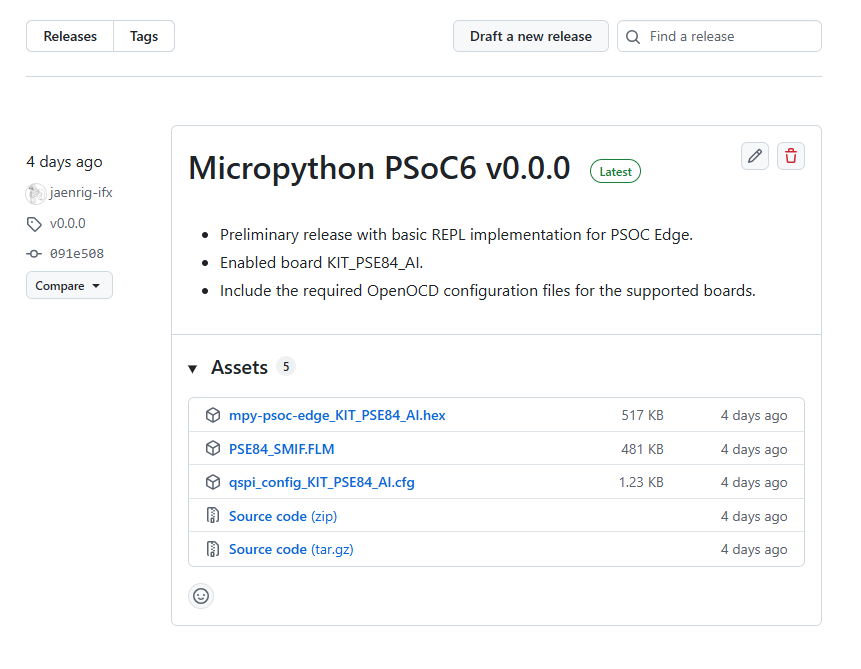
If you want to setup the device with a specific firmware version, you can check the list of available releases in the GitHub release section.
The device-setup command can also assist you with this process. In this case, the board and the desired
version needs to be passed as arguments.
$ python mpy-pse.py device-setup -b KIT_PSE84_AI -v v0.1.0
Warning
Be sure to provide the board name as shown in the device-setup command when running in interactive mode.
Also, provide a valid tag that exists in the release section, in the format vx.y.z.
No fail-safe mechanisms or error verifications are (yet) implemented on the mpy-pse.py utility, and the script will fail to retrieve the necessary firmware file.
Direct binary deployment
Another way to program the board is by directly providing the binary file. This can be also done using the device-setup command.
Specify the board and the path and name of the .hex file using the -f flag as shown below:
$ python mpy-pse.py firmware-deploy -b KIT_PSE84_AI -f pathtodir/mpy-psoc-edge_KIT_PSE84_AI.hex
Multiple devices deployment
If you have multiple PSOC™ Edge boards connected to your computer, you can distinguish them by their serial number, and flash them one by one.
To do so, use the -n flag to provide the serial number of the target board as shown below:
$ python mpy-pse.py device-setup -b KIT_PSE84_AI -n 181F0D5A01212300
Alternatively, you can deploy a firmware file to all connected boards if you have a device YAML file following the etdevs specification.
Note
This option is only supported on Linux and MacOS systems. etdevs is not currently enabled for Windows.
First, ensure that the etdevs package is installed:
$ pip install etdevs
Then, create a YAML file (e.g., devs.yaml) with the board name and the uid (debugger serial number) for all the connected available boards:
- name: KIT_PSE84_AI
  uid: 181F0D5A01212300

- name: KIT_PSE84_AI
  uid: 181F0D5A01212400

  ...
Finally, run the device-setup command providing the YAML file with the -d flag:
$ python mpy-pse.py device-setup -b KIT_PSE84_AI -d devs.yml
Getting the firmware
The binary .hex files are available in the GitHub release section. All PSOC™ Edge firmware versions for each of the supported boards can be found there.
Other installation methods
Cypress Programmer
Alternatively, you can directly flash the firmware binary file with the ModusToolbox™ Programming Tools (minimum version required is 1.6.0).
It allows you to program the PSOC™ Edge microcontroller family with just a few clicks from your Windows, Linux, or MacOS machine. Follow the instructions at the provided link to download and install the tool.
After that, select the downloaded MicroPython firmware .hex file to be deployed on the PSOC™ Edge. Then, in the upper menu, select the connected Board, click on Connect, and finally click on Program. The log section will show the progress and notify you when the firmware deployment on the controller is completed.
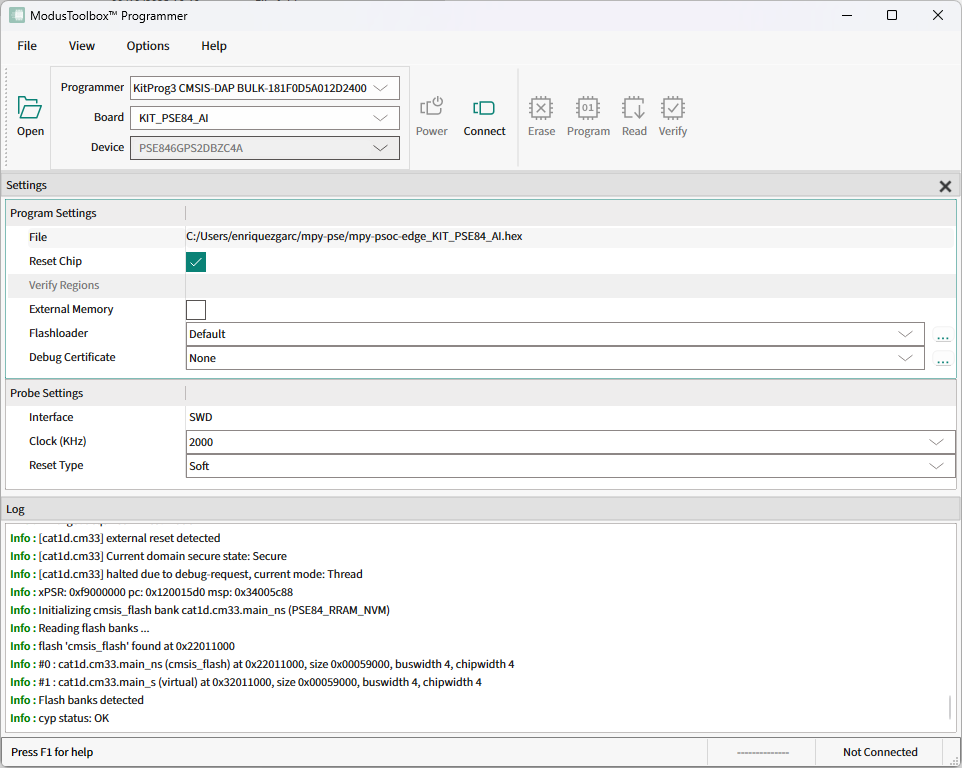
For a detailed description on how to use the ModusToolbox™ Programmer tool, please consult the ModusToolbox™ Programmer User Guide.